global $_W;

$_get_uid = $_GET['uid'];
$open_id =  $_W['fans']['tag']['openid'];
$tpl_id = 'QKU_Q60JfbZLgjLYoKL509vj7YFVUh3uCW8vX3bbGWs';

load()->model('mc');
$acc = mc_notice_init();

$data = array(
    'first' => array(
        'value' => "您好,您的朋友已注册成功",
        'color' => '#ff510'
    ) ,
    'keyword1' => array(
        'value' => 'test name',
        'color' => '#ff510'
    ) ,
    'keyword2' => array(
        'value' => date('Y-m-d'),
        'color' => '#ff510'
    ) ,
    'remark' => array(
        'value' => "您好,您的朋友已注册成功",
        'color' => '#ff510'
    )
);

$rt = $acc->sendTplNotice($open_id, $tpl_id, $data);

###################################################

$data = array(
    'first' => array(
        'value' => "尊敬的XX您好,酒店佣金已充入您的帐户!",
        'color' => '#ff510'
    ) ,
    'order' => array(
        'value' => '',
        'color' => '#ff510'
    ) ,
    'money' => array(
        'value' => '****',
        'color' => '#ff510'
    ) ,
    'remark' => array(
        'value' => "请进入会员中心进行提现操作。",
        'color' => '#ff510'
    ) ,
);

$rt = $acc->sendTplNotice($open_id, $tpl_id, $data);
每日归档: 2019年5月17日
微擎 生成二维码&下载二维码
新建一个类文件code.php
load()->library('qrcode');
class code{
    //生成二维码
    //参数: $content:二维码的内容 string
    //      $size:二维码的尺寸  string
    public function createCode($content,$size){
            $errorCorrectionLevel = "L";//错误校正级别
            $code = QRcode::png($content, false, $errorCorrectionLevel,$size);
            return $code;
    }
    //下载二维码
    //参数:二维码的内容数据content 大小size
    public function downloadCode($content,$size){
        $code = $this->createCode($content,$size);
        $name = random(8);
        header('cache-control:private');
        header('content-type:image/jpeg');
        header('content-disposition: attachment;filename="'.$name.'.jpg"');
        readfile($code);
    }
}
在需要用到此方法的地方实例化。(注意文件的路径问题,避免实例化出错)
$code = new code();
$res_code = $code ->createCode("这里放的是二维码的内容","5");//生成二维码
$download_code = $code ->downloadCode("这里是二维码的内容","5");//下载二维码
配置码云git自动更新的webhook
配置项目提交到git的时候自动同步服务器代码
一、在服务器项目跟目录新建文件hook.php 代码如下:
<?php
$json = file_get_contents("php://input");
$data = json_decode($json,true);
if (isset($data['ref']) && $data['total_commits_count']>0) {
    $res = PHP_EOL."pull start ——————————————————————".PHP_EOL;
    $res .= shell_exec("cd /home/www/leokim && git pull https://xxxxxx.com:passwod@gitee.com/xxxx/xxxx.git 2<&1 ");
    $res_log = '——————————————————————————————'.PHP_EOL;
    $res_log .= $data['user_name'] . ' 在' . date('Y-m-d H:i:s') . '向' . $data['repository']['name'] . '项目的' . $data['ref'] . '分支push了' . $data['total_commits_count'] . '个commit:'.$data['commits']['message'];
    $res_log .= $res.PHP_EOL;
    $res_log .= "pull end ——————————————————————————".PHP_EOL;
    file_put_contents("/home/wwwlogs/webhook/".date('Y-m-d',time()).".txt", $res_log, FILE_APPEND);//写入日志到log文件中
}
?>
二、配置码云webhook:
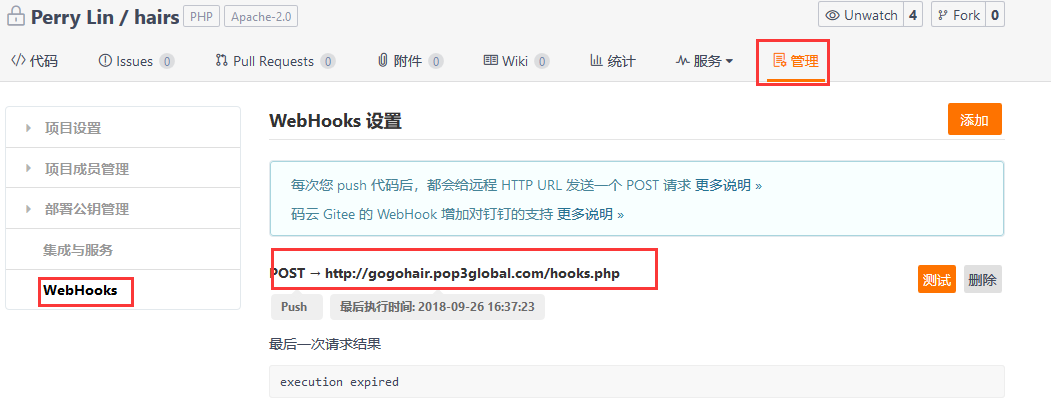
三、确认服务器安装了git,在web目录下clone 项目:git clone https://gitee.com/xxxx/xxxx.git;
四、把git的目录权限改为web用户权限: chown -r www:www
五、手动更新代码:cd /home/www/leokim && git pull;
六、git pull 冲突或错误时,用命令git stash && git pull解决冲突或错误